Redesigning To Simplify Professional Transcoding Through a Two-Level UX
Overview
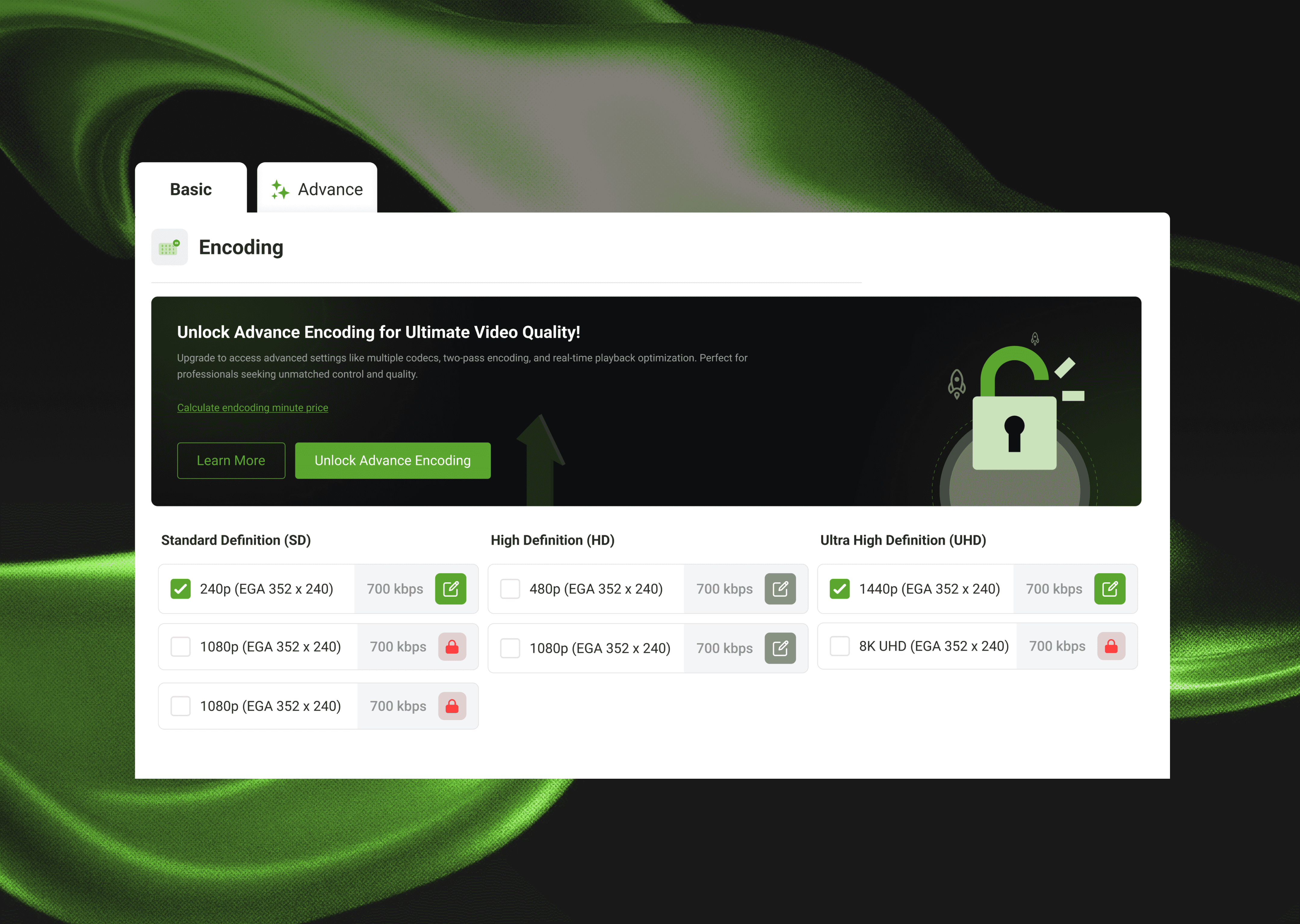
Advanced transcoding had dozens of complex controls that overwhelmed users. I redesigned the experience into a 2-mode system that matched user expectations and increased clarity. Basic = simple presets Advanced = full professional settings (locked until upgrade)
Challenge
The challenge demanded organizing complex encoding settings into a usable workflow. The challenge included:
Too many settings on one page
Users are unaware of the advanced value proposition
Competitors charged extra for basic features
No structured workflow
Objective & Goal
To simplify the encoding process while showcasing advanced capabilities to drive upgrades.
Process
To reduce complexity, I separated the encoding experience into Basic and Advanced modes. I designed clear preset-based controls for beginners, while exposing advanced settings in a locked, explorable format to drive upgrades. Tooltips, banners, and structured settings layouts created a workflow that was powerful yet easy to navigate. In short, my process can be summarized in the following steps
Split into Basic & Advanced modes
Adding a value banner encouraging advanced exploration
Locked advanced UI (gamified)
Upgrade the modal with a feature comparison
“Calculate Encoding Price” CTA for quick price estimates
Cleaner advanced settings layout
Result
Redesigned the onboarding experience for a global CDN SaaS platform to improve user activation and retention. By simplifying the flow, refining plan categorization, and integrating customer segmentation, the redesign achieved 84% more direct purchases, 33% fewer inactive users, and a 78% boost in monthly revenue — proving the power of data-driven UX design in SaaS environments.
Learnings
Progressive disclosure was central in transforming a complex workflow into a digestible structure. The locked previews created curiosity and showcased value, while mental model alignment (Basic vs Advanced) helped users immediately understand where they belonged.
Additional Learnings:
Showing value is more effective than explaining value.
Structured modes prevent overwhelming first impressions.
Gamified exploration supports voluntary upgrades.
You’ve seen the results now see
Figma File
I document everything in Figma the ideas, the iterations, the experiments.
Take a peek, it’s all there.
CLICK TO READ
How Delivery Hero streamlines marketing reporting across all their brands with Clarisights. How Delivery Hero streamlines marketing reporting across all their brands with Clarisights. How Delivery Hero streamlines marketing reporting across all their brands with Clarisights. How Delivery Hero streamlines marketing reporting across all their brands with Clarisights. How Delivery Hero streamlines marketing reporting across all their brands with Clarisights. How Delivery Hero streamlines marketing reporting across all their brands with Clarisights. How Delivery Hero streamlines marketing reporting across all their brands with Clarisights. How Delivery Hero streamlines marketing reporting across all their brands with Clarisights. How Delivery Hero streamlines marketing reporting across all their brands with Clarisights. How Delivery Hero streamlines marketing reporting across all their brands with Clarisights. How Delivery Hero streamlines marketing reporting across all their brands with Clarisights